5/03/2016

A Modern Spin on a Vintage Mother's Day Pin


In honor of Mother's Day, I wanted to create a paperweight for our Design Blog that put a modern spin on a classic 1950s Mother's Day pin.

Some lipstick red paint and a scrap of toile print paper are all it took to give this pressed metal relic the character it desperately needed.


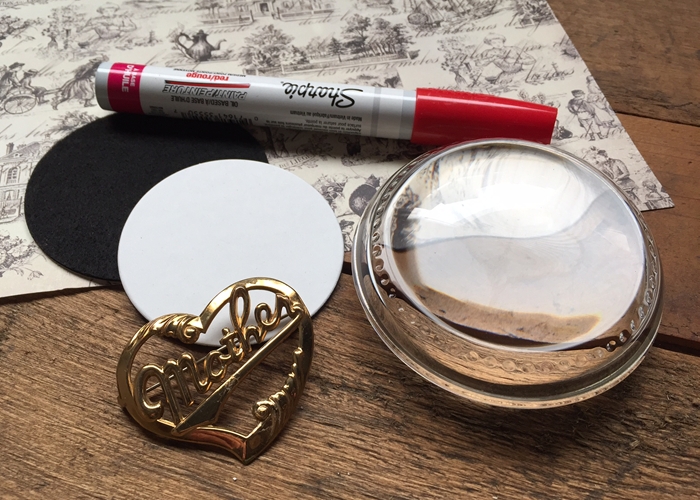
The materials I used for this project include an Heirloom Dome Paperweight Kit, scrapbook paper with a toile pattern, the "Mother" pin, and an oil based paint pen in red (Sharpie).


I started by removing the pin mechanism with a pair of pliers so the back of the piece would lay flat.


The pin was placed on a scrap piece of cardboard before it was painted with an oil based paint pen made by Sharpie.  Spray paint would also work very nicely for this step.  You could even try a bright shade of nail polish.


The self-adhesive mounting board was placed on the back of the scrapbook paper and trimmed with a pair of scissors.


After the paint dried completely, I applied hot melt glue to areas of the back of the pin where there was a larger surface to work with.  (I avoided smaller, intricate areas such as the letters because the glue would be visible.)


After the pin was glued to the mounting board, the mounting board was placed in the center of the adhesive side of the paperweight kit's bottom pad.  The adhesive area of the bottom pad that remains exposed is what will adhere to the bottom of the paperweight.


After the paperweight was cleaned to remove any dust and fingerprints, the bottom pad was centered onto the bottom of the paperweight and pressed into place.


This design idea can be applied to so many different things... coins, Monopoly pieces, or something as simple and ordinary as a key.  Brightly painted, these objects become art.

3/23/2016

Personalizing Paperweights with Text: A Family Recipe with Grandma's Photo


Many families have recipes that have been passed down from mother to daughter (or son) for two or more generations.  They're often written on index cards with corners and edges that have been lovingly worn and tattered throughout the years.  Some have been stained by a drop or two of vanilla, or even scorched from a slight mishap.

These written family treasures are often stored in a recipe box or scribbled on the inside cover of a cookbook.  This design idea, following my series on personalizing paperweights with text, will turn  timeless recipes into beloved keepsakes.  Adding a family photo will make your paperweight even more special.

Here's how I made it...

I used the Large Rectangle Paperweight Kit for this project because it has a generous display area that measures 4 1/2" x 2 3/4".  Granted, not all recipes will fit into this space.  You can edit the text of your recipe to shorten it.  You can also experiment with fonts, font sizes, and different layouts.  Still, a recipe with many steps will be a challenge.

The layout for the design was created using a simple publishing program called Microsoft Publisher.

I started by drawing a box that was slightly larger than the measurements of the Large Rectangle's display area.  This was easy to do using the program's ruler feature as a guide.

The text of the recipe and the ingredients were typed into separate text boxes so I could position them independently.  After moving them around a little, I decided the best fit was to place the instructions on the left and the ingredients to the right.  The font (Times New Roman) was sized to 9pt which was still very easy to read.

The photograph was added to some blank space above the ingredients.  To make the title of the recipe stand out, it's in a larger, red typewriter font.  I also added a vertical, dashed line in red to separate the two columns.

ADDING A BACKGROUND COLOR

I wanted to include an alternate version of the same artwork to show you how a few simple changes can dramatically transform the look of your design.

The alternate version has a blue background, white text, and white lines.  Everything else is exactly the same.


PRINTING

I printed my artwork on premium photo paper using my inkjet printer.  I used the best print quality setting possible.

3/08/2016

Personalizing Paperweights with Text: Woodgrain Background with Handwritten Font

This is the second blog post in my series on designing and laying out text for your paperweights.

Today I've used a woodgrain image for my background and added some text in one of my favorite fonts, Brannboll Smal.  I also incorporated some red hearts to add some much needed balance and color.  The hearts also manage to bring the message to life.

Here's how the design came together.


As I've mentioned in the past, you don't need expensive, complex software to work on your designs.  I used Microsoft Publisher to make this point.

I started by drawing a circle 3 1/4" in diameter.  This is the size of the display area for the Large Dome Paperweight Kit.


Once the circle was on the page, I begin to add the elements of the design.  I imported a whitewashed, wood background and added the text and hearts.

I don't have authorization to distribute the woodgrain background.  However, you can find many woodgrain images through Google in a variety of colors and textures.  

 
The font I used is Brannboll Smal which may be downloaded from FontSpace.com.  (This is a third- party site that is not affiliated with PhotoWeights.)


LAYING OUT YOUR TEXT

If you don't have much experience laying out text, and you need a little help, do a Google search for Faith Hope Love and click on 'Images' at the top of the page.  You'll see a number of artwork examples in different fonts, colors, and styles.

Once you've worked on a few examples of your own, you'll become more and more comfortable working with different fonts, backgrounds, and colors.

3/03/2016

Personalizing Paperweights with Text: Chalkboard Background & Fonts


Since I started PhotoWeights more than 15 years ago, I've answered thousands of questions from customers who needed a little advise to help them complete a design.  One of the most frequent dilemmas is how to lay out text when you want your paperweight to showcase quotes, names, and special sayings.

I thought I'd do a series of blog posts that show a variety of ways you can easily design and arrange text for your paperweights.  We'll start with one of the most popular styles, chalkboards.

You can find a variety of free chalkboard backgrounds and fonts online.  I'll provide you with the sources I used.  You can also search for additional resources on your own.

CHALKBOARD BACKGROUND

The foundation of this design is obviously a chalkboard background.  You can use a solid color (black, charcoal, or whichever color you prefer), or an image background like the one I used (below).  To download this background, click on it to enlarge and right click to save. (This may work differently on your computer.)


FONTS

Because chalkboard art is so incredibly popular, there are scores of fonts to choose from.  These range from beautiful, handwritten fonts to more bold and boxy typeface.

FontSpace.com has a very nice selection of free chalkboard fonts.  If you'd like to view them, go to http://fontspace.com/category/chalkboard.  (This is a third-party site that is not affiliated with PhotoWeights.)

THE DESIGN

You don't need expensive, complex software to put your designs together.  I used Microsoft Publisher.

After I placed the chalkboard background onto my Publisher page, I sized it to fit the display area of the Rectangle Paperweight Kit. This is easy to do with either a scale or cropping tool

After I typed the text and placed it over the background, I played around with a few different fonts before I chose DJB Skritch Skratch for the quote and Cambria for Pearl Bailey's name.  The hearts are from the font KG Flavor and Frames Six.  (The heart outlines are the letter 'e' and the solid heart is 'z').  The hearts were sized differently and rotated slightly.

After your text and decorative elements have been positioned on the background, print a draft copy of your artwork so you can place it under your paperweight to make sure you like the way it looks.  Each time you make a noticeable adjustment, print a draft to check it again until it's just right.

PRINTING

I printed my artwork on a B&W laser printer using plain paper on the fine setting.  This gives it a matte look that you sometimes lose on an ink jet printer.


Need Help?

If you have any specific questions about designing text for your paperweight, leave a comment below.  You can also email me directly at susan@photoweights.com.

10/06/2015

Dad's Tackle Box Paperweight - Vintage Fishing Lure and Line Sinker Tin Under a Glass Dome


I thought I'd work on a paperweight design for the guys today.  I'm not suggesting that fishing is strictly a guy thing.  I just wanted to do something a little less girlie that didn't involve bows and glitter.

If you're thinking about paperweight design ideas to create for holiday gifts, a collage similar to this can be created in a variety of themes.  You just need to keep the displayed items within the confines of the paperweight you're working with.


For this project I used the Heirloom Dome Paperweight Kit (PhotoWeights: Heirloom Dome).  My display items include a vintage postcard (for the background) and two finds from an old tackle box; a fishing lure and a tin that once held line sinkers.

Using a template (PhotoWeights: Display Area Template) I chose the area of the postcard I wanted to use as my background and traced a cut line along the opening.

I cut the circular area out of the postcard with a pair of scissors.

The postcard was affixed to the adhesive side of the mounting board.

I used liquid glue to attach both the tin and the fishing lure to the background (Aleene's Original Tacky Glue).  I chose a liquid glue because I wanted to be able to make some adjustments if I had to.  With hot melt glue, subtle shifts are impossible after a second or two.

Before I attached the fishing lure to the background, I secured the metal spinner to the yellow lure with hot melt glue so there would be no movement between the two pieces.  A line of tacky glue was applied along the bottom of the yellow part before it was set into place on the background.  I used a small dab of hot melt glue beneath the white material wrapped around the hook to secure the hook in place.

When you're including a fishing hook in your design, use one that does not include multiple hooks that may poke through the bottom of the paperweight.

IMPORTANT:  Before you move to the next steps, it's important to allow any liquid glue to dry completely.  If you place the artwork in your paperweight when the glue is still wet or even partially dry, condensation from the evaporation of the glue will form inside the paperweight.  This will result in a cloudy film.

After the liquid glue dried completely, the finished mounting board was centered and placed onto the adhesive side of the bottom pad.

After I cleaned the paperweight with glass cleaner and removed any dust, I centered the bottom pad over the base of the paperweight and lowered it into place.  To create a tight bond between the glass and the adhesive, I ran my thumb along the outside edge of the bottom pad.

A close up photo of the finished paperweight.

Finding the right items to use in a collage paperweight can be challenging.  There are size limitations because you're working with a limited area.  You also have to take weight into consideration.

When you're experimenting with layouts and designs, use your paperweight's mounting board to trace an outline on a plain piece of paper.  Use this as your temporary canvas by arranging items within the trace mark.  Place the glass paperweight over your layout to see how it looks.  Keep doing this until you're happy with the result.  (Remember to take a photograph for reference so you can easily recreate it.)

I'm always happy to help if you need help with your paperweight projects.  Don't hesitate to write me at susan@photoweights.com.


Posted on Tuesday, October 06, 2015 | Categories:

9/08/2015

Make a Felt Silhouette Paperweight of Your Favorite Dog (or Cat) Breed


Creating silhouettes can be challenging when you're cutting them out of fabric or felt.  This project offers a few tips that will hopefully make the process easier; whether the silhouette is of a son, daughter, or your favorite four-legged friend.


This design only required a few supplies.  Your list of supplies will change, depending on how you choose to embellish your silhouette.

My supplies included a sheet of green felt, background paper, a small piece of red ribbon, and some self-adhesive monogram letters.


The first step in creating your silhouette is to find the right artwork.  Many silhouettes are available online.  Just do a Google search for what you're looking for.  You can be generic (dog silhouette) or specific to a breed (scottie dog silhouette).  Be sure the artwork you choose is available for public use.

Before you print the artwork, you'll need to edit it in a word processing program or desktop publisher.  In addition to adjusting it to the right size, you'll need to flip the image horizontally so it faces the opposite direction of how you'd like it to appear.  (If you want the dog's tail to be to the right, print it so the tail is to the left (as shown above).

For better cutting results, print the image onto cardstock paper (about 110 lb).  I recommend printing three silhouettes with generous spacing between them.  If you make a cutting mistake, you'll have two extras on hand.


 Apply double-sided tape to the back of the silhouette you've printed.


After you've decided which side of the felt you would like the silhouette to be cut from, place the taped side of the printed silhouette to the opposite side.  If your artwork is printed on cardstock, it will add some stiffness to the felt which will make it much easier to achieve a more precise cut.

The felt I used is from a 9" x 12" sheet sold in Michaels stores under the brand Creatology.  The color is Olive.


Using a pair of good, sharp scissors, carefully cut your silhouette out with as much detail as you're able to achieve.  The paper on the back of the shape may not easily come off (depending on the strength of the tape's adhesive).  If this is the case, remove as much of the paper as you're able without altering the shape.


I cut a small piece of ribbon to act as the scotty's collar.  The ribbon was glued to the front of the felt and the ends were wrapped around to the back, glued, and secured with a piece of tape.


I used a scrap of decorative scrapbooking paper as the background.  Simply place the adhesive side of your mounting board (included with each PhotoWeights kit) and trim any paper that extends beyond the edge of the board.


The felt silhouette was attached to the background with white glue.  Use a cotton swab to spread the glue and remove any excess.  This will prevent any glue from seeping out from underneath.


Two monogram stickers were placed on the felt.  Although these are self-adhesive, I used a little white glue to make sure they stay put.  These sickers are from a collection by Momenta (ST-5263 Alpha Blk).  They have the look of miniature typewriter keys and measure 3/8" in diameter. 


Before I finished the paperweight, I wanted to add one last touch; a gold tag on the dog's collar.  I wasn't able to find anything in my craft drawers that would work, so I used the cap of mini craft brad.  After I removed the arms, I placed the cap on a piece of double-stick tape applied to the back of a business card.  The tape held it in place so I could easily touch it up with a gold paint pen.


The newly gilded, metal brad was the perfect finishing touch.  It was set on a generous dab of white glue.


FINISHING YOUR PAPERWEIGHT

After the glue had time to dry completely, the paperweight was finished by following the illustrated instructions included with our paperweight kits.


The mounting board (with finished artwork) was placed face-down into the recessed area on the bottom of the paperweight (above-left).  The adhesive bottom pad (also included with each PhotoWeights kit) was applied over the bottom of the paperweight (above-right).


I hope this project has inspired you to create a felt silhouette paperweight of your own.  If you'd like to view a tutorial about creating silhouettes from profile photographs, I recommend this 2010 blog post from Nelley Kelley Studio. 

Posted on Tuesday, September 08, 2015 | Categories:

6/15/2015

This Child's Antique Mirror Makes an Adorable Papeweight... Perfect for Quick Makeup Checks at Work


The centerpiece of this paperweight design is an antique hand mirror from a child's set.  It's made of nickel plated metal that I was able to brighten up with a little silver polish.

When the mirror is set it against a background of vintage-inspired paper, it's transformed into a special and unique piece.  It's also something you can keep within reach for those times you need to do a quick check of your hair or makeup at work.


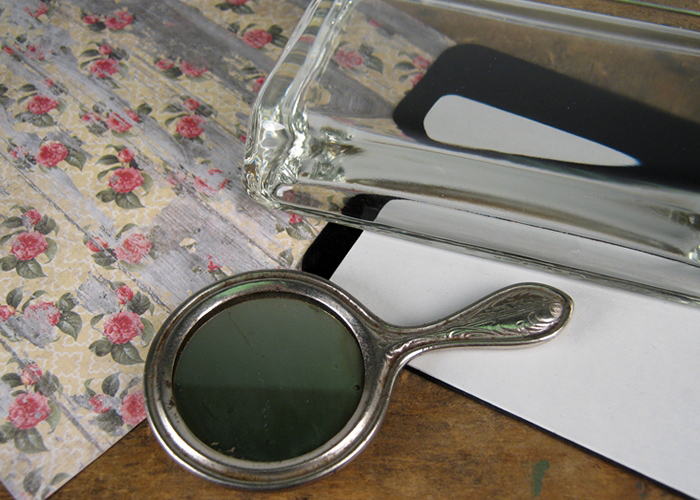
I used the Large Rectangle Paperweight Kit (PhotoWeights: Large Rectangle) for this project.  The only other supplies I used included a scrap of decorative paper, the mirror, and some ribbon.  A hot glue gun was also used.


The first step to creating a paperweight that features a dimensional object is to create a background for the object to be adhered to.  This is done by applying paper, fabric, or other type of material to the self-adhesive mounting board that's included with each PhotoWeights paperweight kit.

In the image above, the adhesive side of the black mounting board was placed on the reverse side of a piece of decorative, floral paper.  (The floral paper had another design printed on the reverse side.)


After your background is attached to your mounting board, use a pair of sharp scissors to trim any material that extends beyond the edge of the board.  (The board acts as an excellent cutting guide.)


I tied a small bow around the handle of the mirror to dress it up a little.  The green bow coordinates with a color found on the floral paper I used.

Tip:  Double check to make certain your mirror and any embellishments you add will fit within the display area of your paperweight, especially the depth.


After I cleaned the mirror, I placed it on the mounting board and centered it.

Because I'll be using hot melt glue, there will be little opportunity to reposition the mirror once it's glued down.  I used removable tape (washi tape) as a guide to mark where the left and right of the mirror should be positioned.


The center of the back of the mirror is slightly raised, so I applied the hot glue around the center to avoid adding any additional thickness to the final design.  A dab of glue was also placed on the handle for added support.


After the mirror was secured in place, the guide tape was easily removed.


The mounting board (with mirror attached) was placed face-down into the recessed area on the bottom of the paperweight.


I finished the paperweight by applying the self-adhesive bottom pad, included with each PhotoWeights paperweight kit.


FINDING A MIRROR

Antique mirrors such as the one I used may be found on websites such as Etsy.com and Ebay.com. You need a smaller mirror which may be described as a toy mirror, doll mirror, or child's mirror.

Most craft stores sell small, thin, unframed mirrors that are perfect for creating mirrored paperweight designs.  You may also be able to use the mirror from an old compact.